> ## Documentation Index
> Fetch the complete documentation index at: https://docs.gaife.com/llms.txt
> Use this file to discover all available pages before exploring further.
# Crawl
# FirecrawlCrawl
The FirecrawlCrawl tool recursively visits multiple pages starting from a base URL, perfect for scraping entire websites
or specific sections with advanced filtering and rate limiting capabilities.
## Overview
FirecrawlCrawl is designed for comprehensive website exploration and data extraction. It intelligently navigates through
website structures, respects crawling boundaries, and efficiently processes multiple pages while maintaining rate limits
and following best practices.
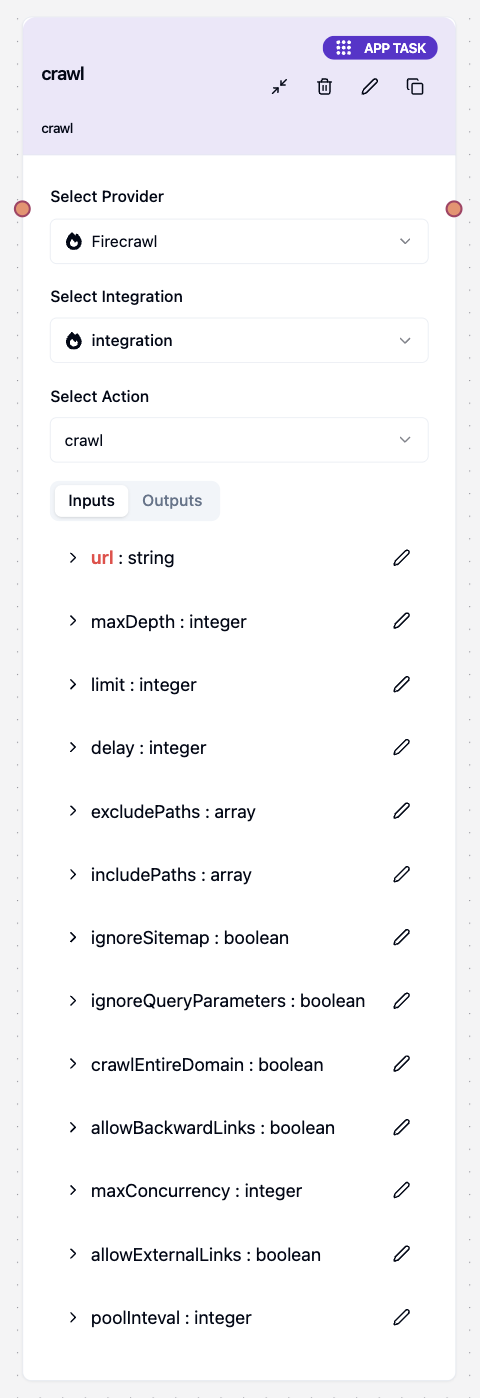
## Input Parameters
| Parameter | Type | Required | Default | Description |
| ----------------------- | --------- | -------- | ------- | ------------------------------------------------------- |
| `url` | string | Yes | - | Starting URL for the crawl |
| `limit` | number | No | 10 | Maximum number of pages to crawl |
| `maxDepth` | number | No | - | Maximum depth to crawl from the starting URL |
| `maxDiscoveryDepth` | number | No | - | Maximum depth for discovering new URLs |
| `includePaths` | string\[] | No | - | URL patterns to include in the crawl |
| `excludePaths` | string\[] | No | - | URL patterns to exclude from the crawl |
| `ignoreSitemap` | boolean | No | false | Whether to ignore the website's sitemap |
| `ignoreQueryParameters` | boolean | No | - | Whether to ignore URL query parameters |
| `allowBackwardLinks` | boolean | No | false | Allow crawling links that go back in the site hierarchy |
| `crawlEntireDomain` | boolean | No | - | Whether to crawl the entire domain |
| `allowExternalLinks` | boolean | No | - | Whether to follow external links |
| `delay` | number | No | - | Delay between requests (milliseconds) |
| `maxConcurrency` | number | No | - | Maximum number of concurrent requests |
| `scrapeOptions` | object | No | - | Additional scraping options for each page |
| `poolInteval` | number | No | 2 | Polling interval for checking crawl status |
 ## Basic Usage
### Simple Website Crawling
To crawl multiple pages from a website:
1. **Enter the Starting URL**: Input the base URL where crawling should begin
2. **Set Page Limit**: Define the maximum number of pages to process
3. **Configure Depth**: Set how deep the crawler should go
4. **Run the Task**: Execute the crawling operation
**Example Configuration:**
* URL: `https://example.com`
* Limit: `50` pages
* Max Depth: `3` levels
## Basic Usage
### Simple Website Crawling
To crawl multiple pages from a website:
1. **Enter the Starting URL**: Input the base URL where crawling should begin
2. **Set Page Limit**: Define the maximum number of pages to process
3. **Configure Depth**: Set how deep the crawler should go
4. **Run the Task**: Execute the crawling operation
**Example Configuration:**
* URL: `https://example.com`
* Limit: `50` pages
* Max Depth: `3` levels
 ## Path Filtering Configuration
Control which pages to include or exclude from your crawl using path patterns.
### Include Paths Configuration
Specify URL patterns that should be crawled:
1. **Add Include Patterns**: Define specific paths to focus on
2. **Use Wildcards**: Employ `*` for pattern matching
3. **Target Sections**: Focus on relevant website sections
**Example Include Patterns:**
* `/blog/*` - All blog pages
* `/products/*` - Product catalog
* `/docs/*` - Documentation
* `/news/2024/*` - Recent news
### Exclude Paths Configuration
Specify URL patterns that should be avoided:
1. **Add Exclude Patterns**: Define paths to skip
2. **Filter File Types**: Exclude PDFs, images, etc.
3. **Skip Admin Areas**: Avoid private sections
**Example Exclude Patterns:**
* `/admin/*` - Admin pages
* `/private/*` - Private sections
* `*.pdf` - PDF files
* `/search?*` - Search results
* `/cart/*` - Shopping cart pages
## Advanced Configuration
### Rate Limiting Settings
Configure crawling speed to be respectful to target websites:
1. **Set Delay**: Time between requests (milliseconds)
2. **Control Concurrency**: Number of simultaneous requests
3. **Manage Load**: Balance speed with server respect
**Recommended Settings:**
* **Delay**: `1000-3000ms` (1-3 seconds)
* **Max Concurrency**: `1-2` requests
* **Page Limit**: `10-100` pages
### Depth Control Settings
Control how deep the crawler explores the website:
1. **Max Depth**: Actual content scraping depth
2. **Discovery Depth**: URL discovery depth
3. **Domain Scope**: Stay within or explore beyond domain
**Example Configuration:**
* **Max Depth**: `3` (scrape content 3 levels deep)
* **Discovery Depth**: `5` (find URLs 5 levels deep)
* **Crawl Entire Domain**: `true/false`
## Path Pattern Examples
### Common Include Patterns
Target specific content types and sections:
**Content Sections:**
* `/blog/*` - All blog pages
* `/articles/*` - Article pages
* `/news/*` - News content
* `/docs/*` - Documentation
**Product & Commerce:**
* `/products/*` - Product pages
* `/catalog/*` - Product catalog
* `/categories/*` - Category pages
**Specific Years/Dates:**
* `/blog/2024/*` - Recent blog posts
* `/news/2024/*` - Current year news
### Common Exclude Patterns
Avoid unnecessary or problematic content:
**Admin & Private:**
* `/admin/*` - Administrative pages
* `/private/*` - Private sections
* `/user/*/private` - User private areas
**File Types:**
* `*.pdf` - PDF documents
* `*.jpg`, `*.png` - Image files
* `*.zip` - Archive files
**Dynamic Content:**
* `/search?*` - Search result pages
* `/cart/*` - Shopping cart
* `/checkout/*` - Checkout process
## Response Format
## Path Filtering Configuration
Control which pages to include or exclude from your crawl using path patterns.
### Include Paths Configuration
Specify URL patterns that should be crawled:
1. **Add Include Patterns**: Define specific paths to focus on
2. **Use Wildcards**: Employ `*` for pattern matching
3. **Target Sections**: Focus on relevant website sections
**Example Include Patterns:**
* `/blog/*` - All blog pages
* `/products/*` - Product catalog
* `/docs/*` - Documentation
* `/news/2024/*` - Recent news
### Exclude Paths Configuration
Specify URL patterns that should be avoided:
1. **Add Exclude Patterns**: Define paths to skip
2. **Filter File Types**: Exclude PDFs, images, etc.
3. **Skip Admin Areas**: Avoid private sections
**Example Exclude Patterns:**
* `/admin/*` - Admin pages
* `/private/*` - Private sections
* `*.pdf` - PDF files
* `/search?*` - Search results
* `/cart/*` - Shopping cart pages
## Advanced Configuration
### Rate Limiting Settings
Configure crawling speed to be respectful to target websites:
1. **Set Delay**: Time between requests (milliseconds)
2. **Control Concurrency**: Number of simultaneous requests
3. **Manage Load**: Balance speed with server respect
**Recommended Settings:**
* **Delay**: `1000-3000ms` (1-3 seconds)
* **Max Concurrency**: `1-2` requests
* **Page Limit**: `10-100` pages
### Depth Control Settings
Control how deep the crawler explores the website:
1. **Max Depth**: Actual content scraping depth
2. **Discovery Depth**: URL discovery depth
3. **Domain Scope**: Stay within or explore beyond domain
**Example Configuration:**
* **Max Depth**: `3` (scrape content 3 levels deep)
* **Discovery Depth**: `5` (find URLs 5 levels deep)
* **Crawl Entire Domain**: `true/false`
## Path Pattern Examples
### Common Include Patterns
Target specific content types and sections:
**Content Sections:**
* `/blog/*` - All blog pages
* `/articles/*` - Article pages
* `/news/*` - News content
* `/docs/*` - Documentation
**Product & Commerce:**
* `/products/*` - Product pages
* `/catalog/*` - Product catalog
* `/categories/*` - Category pages
**Specific Years/Dates:**
* `/blog/2024/*` - Recent blog posts
* `/news/2024/*` - Current year news
### Common Exclude Patterns
Avoid unnecessary or problematic content:
**Admin & Private:**
* `/admin/*` - Administrative pages
* `/private/*` - Private sections
* `/user/*/private` - User private areas
**File Types:**
* `*.pdf` - PDF documents
* `*.jpg`, `*.png` - Image files
* `*.zip` - Archive files
**Dynamic Content:**
* `/search?*` - Search result pages
* `/cart/*` - Shopping cart
* `/checkout/*` - Checkout process
## Response Format
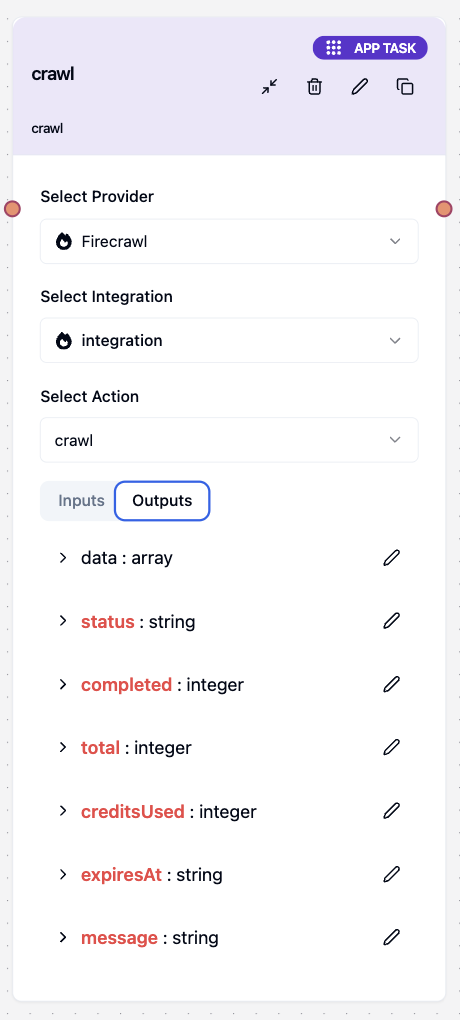 The crawling tool returns an array of scraped pages with comprehensive data:
```json theme={null}
{
"data": [
{
"url": "https://example.com/page1",
"markdown": "# Page 1 Content\n\nPage content here...",
"html": "
The crawling tool returns an array of scraped pages with comprehensive data:
```json theme={null}
{
"data": [
{
"url": "https://example.com/page1",
"markdown": "# Page 1 Content\n\nPage content here...",
"html": "Cleaned HTML content...
",
"links": ["https://example.com/page2", "https://example.com/contact"],
"metadata": {
"title": "Page 1 Title",
"description": "Page description",
"language": "en"
}
},
{
"url": "https://example.com/page2",
"markdown": "# Page 2 Content\n\nMore content...",
"html": "More HTML content...
",
"links": ["https://example.com/page3"],
"metadata": {
"title": "Page 2 Title",
"description": "Another page description",
"language": "en"
}
}
],
"status": "completed",
"completed": 45,
"total": 50,
"creditsUsed": 23,
"expiresAt": "2024-01-15T10:30:00Z",
"message": "Successfully crawled the website"
}
```
## Use Cases
### 📚 **Documentation Crawling**
Extract comprehensive documentation from software projects:
* **URL**: `https://docs.example.com`
* **Include Paths**: `["/docs/*", "/guides/*", "/tutorials/*"]`
* **Exclude Paths**: `["/api/reference/*", "*.pdf"]`
* **Limit**: `200` pages
* **Max Depth**: `6` levels
### 🛍️ **E-commerce Product Cataloging**
Systematically crawl product pages:
* **URL**: `https://store.example.com`
* **Include Paths**: `["/products/*", "/categories/*"]`
* **Exclude Paths**: `["/cart/*", "/checkout/*", "/account/*"]`
* **Limit**: `500` pages
* **Max Depth**: `4` levels
* **Delay**: `2000ms` (respectful crawling)
### 📰 **News and Blog Content**
Gather articles and blog posts:
* **URL**: `https://blog.example.com`
* **Include Paths**: `["/blog/*", "/articles/*", "/news/2024/*"]`
* **Exclude Paths**: `["/admin/*", "/author/*/private", "*.pdf"]`
* **Limit**: `100` pages
* **Max Depth**: `3` levels
* **Delay**: `3000ms` (extra respectful for news sites)
### 🏢 **Company Information Gathering**
Research companies systematically:
* **URL**: `https://company.example.com`
* **Include Paths**: `["/about/*", "/team/*", "/careers/*", "/press/*"]`
* **Exclude Paths**: `["/customer-portal/*", "/admin/*"]`
* **Limit**: `50` pages
* **Max Depth**: `3` levels
 ## Best Practices
### 🚀 **Performance Optimization**
1. **Set Appropriate Limits**
* Use reasonable page limits (10-100 for most cases)
* Set moderate depth levels (2-4 typically sufficient)
* Monitor credit usage during crawls
2. **Use Specific Path Filters**
* Target relevant content with include patterns
* Exclude unnecessary files and admin areas
* Focus on content that matters to your use case
3. **Implement Rate Limiting**
* Use 1-3 second delays between requests
* Limit concurrent requests (1-2 maximum)
* Respect website server capacity
### 🤝 **Respectful Crawling**
1. **Follow Website Guidelines**
* Respect robots.txt files
* Use sitemap when available (`ignoreSitemap: false`)
* Implement appropriate delays
2. **Monitor Resource Usage**
* Track credits consumed during crawls
* Monitor crawl completion rates
* Adjust limits based on website response
3. **Stay Within Boundaries**
* Use `allowExternalLinks: false` to stay on domain
* Set reasonable depth limits
* Avoid overwhelming target servers
### 🎯 **Configuration Accuracy**
1. **URL Format**
* ✅ Always include the protocol: `https://example.com`
* ❌ Avoid incomplete URLs: `example.com`
2. **Path Patterns**
* ✅ Use specific patterns: `/blog/2024/*`
* ✅ Exclude file types: `*.pdf`, `*.jpg`
* ❌ Avoid overly broad patterns: `/*`
3. **Limit Settings**
* ✅ Set realistic page limits
* ✅ Use appropriate depth levels
* ❌ Don't set excessive limits that consume too many credits
## Common Issues and Solutions
### Crawling Takes Too Long
* **Problem**: Crawl operation running for extended periods
* **Solution**: Reduce page limit, increase delays, decrease concurrency
### Getting Blocked by Websites
* **Problem**: Target website blocking crawl requests
* **Solution**: Increase delays (3-5 seconds), use single concurrent request
### Too Many Irrelevant Pages
* **Problem**: Crawling unnecessary or duplicate content
* **Solution**: Use more specific include/exclude patterns, reduce depth
### High Credit Usage
* **Problem**: Consuming too many credits per crawl
* **Solution**: Reduce page limits, exclude large files, focus on relevant content
### Incomplete Results
* **Problem**: Not finding all expected content
* **Solution**: Increase depth limits, check include patterns, verify starting URL
***
Return to Firecrawl integration overview
## Best Practices
### 🚀 **Performance Optimization**
1. **Set Appropriate Limits**
* Use reasonable page limits (10-100 for most cases)
* Set moderate depth levels (2-4 typically sufficient)
* Monitor credit usage during crawls
2. **Use Specific Path Filters**
* Target relevant content with include patterns
* Exclude unnecessary files and admin areas
* Focus on content that matters to your use case
3. **Implement Rate Limiting**
* Use 1-3 second delays between requests
* Limit concurrent requests (1-2 maximum)
* Respect website server capacity
### 🤝 **Respectful Crawling**
1. **Follow Website Guidelines**
* Respect robots.txt files
* Use sitemap when available (`ignoreSitemap: false`)
* Implement appropriate delays
2. **Monitor Resource Usage**
* Track credits consumed during crawls
* Monitor crawl completion rates
* Adjust limits based on website response
3. **Stay Within Boundaries**
* Use `allowExternalLinks: false` to stay on domain
* Set reasonable depth limits
* Avoid overwhelming target servers
### 🎯 **Configuration Accuracy**
1. **URL Format**
* ✅ Always include the protocol: `https://example.com`
* ❌ Avoid incomplete URLs: `example.com`
2. **Path Patterns**
* ✅ Use specific patterns: `/blog/2024/*`
* ✅ Exclude file types: `*.pdf`, `*.jpg`
* ❌ Avoid overly broad patterns: `/*`
3. **Limit Settings**
* ✅ Set realistic page limits
* ✅ Use appropriate depth levels
* ❌ Don't set excessive limits that consume too many credits
## Common Issues and Solutions
### Crawling Takes Too Long
* **Problem**: Crawl operation running for extended periods
* **Solution**: Reduce page limit, increase delays, decrease concurrency
### Getting Blocked by Websites
* **Problem**: Target website blocking crawl requests
* **Solution**: Increase delays (3-5 seconds), use single concurrent request
### Too Many Irrelevant Pages
* **Problem**: Crawling unnecessary or duplicate content
* **Solution**: Use more specific include/exclude patterns, reduce depth
### High Credit Usage
* **Problem**: Consuming too many credits per crawl
* **Solution**: Reduce page limits, exclude large files, focus on relevant content
### Incomplete Results
* **Problem**: Not finding all expected content
* **Solution**: Increase depth limits, check include patterns, verify starting URL
***
Return to Firecrawl integration overview