> ## Documentation Index
> Fetch the complete documentation index at: https://docs.gaife.com/llms.txt
> Use this file to discover all available pages before exploring further.
# Overview
# Firecrawl Integration
Firecrawl is a powerful web scraping and crawling tool that allows you to extract structured data from websites. This
integration provides two main functionalities for comprehensive web data extraction.
## Overview
The Firecrawl integration consists of two specialized tools designed for different web scraping needs:
Extract data from a single webpage with support for multiple formats,
structured extraction, and AI-powered content analysis.
Recursively crawl and scrape multiple pages from a website with advanced
filtering and rate limiting options.
## Key Features
### 🎯 **Flexible Data Extraction**
* Multiple output formats: Markdown, HTML, JSON, Screenshots, Links
* AI-powered content extraction using natural language prompts
* Schema-based structured data extraction
### 🔧 **Advanced Configuration**
* Customizable crawling depth and limits
* Path filtering with include/exclude patterns
* Rate limiting and concurrency controls
### 📸 **Visual Content Capture**
* Standard and full-page screenshots
* Base64 encoded image output
* Perfect for visual documentation and monitoring
### 🧠 **AI-Enhanced Extraction**
* Natural language prompts for flexible data extraction
* Structured schemas for precise data collection
* Intelligent content parsing and organization
## Authentication
Before using any Firecrawl tools, you need to obtain an API key from [Firecrawl](https://firecrawl.dev) and configure it
in your application.
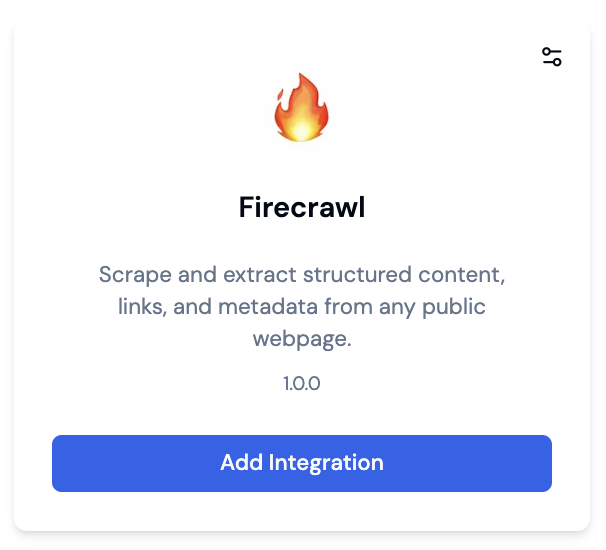 ### Step 1: Get Your API Key
First, sign up for a Firecrawl account and obtain your API key from the dashboard.
### Step 2: Configure Authentication in UI
To set up Firecrawl authentication in the application interface:
1. Navigate to the Tools section in your agent configuration
2. Select Firecrawl from the available tools
3. Enter your API key in the authentication field
### Step 1: Get Your API Key
First, sign up for a Firecrawl account and obtain your API key from the dashboard.
### Step 2: Configure Authentication in UI
To set up Firecrawl authentication in the application interface:
1. Navigate to the Tools section in your agent configuration
2. Select Firecrawl from the available tools
3. Enter your API key in the authentication field
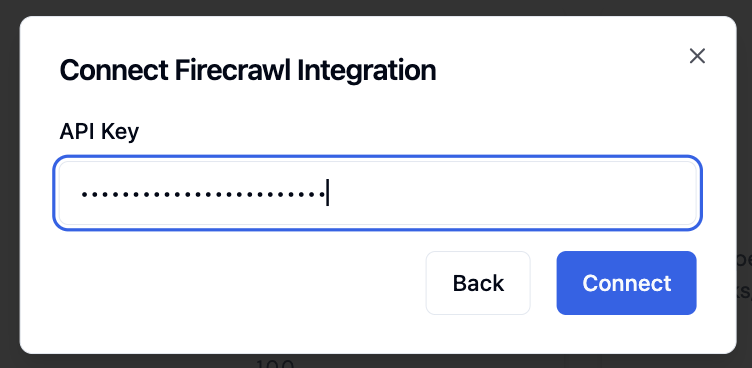 ### Step 3: Verify Connection
Once configured, the system will validate your API key and display a connection status indicator.
Keep your API key secure and never share it publicly. The API key provides
access to your Firecrawl account and billing.
### 📊 **Content Analysis & Research**
* Extract articles, blog posts, and documentation
* Gather competitive intelligence
* Monitor website changes and updates
### 🏢 **Lead Generation & Business Intelligence**
* Extract company information and contact details
* Analyze product catalogs and pricing
* Monitor competitor websites
### 📱 **Web Monitoring & Testing**
* Take screenshots for visual regression testing
* Monitor website availability and content changes
* Extract structured data for analysis
### 🔍 **SEO & Marketing**
* Analyze meta tags, keywords, and content structure
* Extract social media links and contact information
* Monitor backlinks and site structure
## Response Format
Both tools return data in a consistent format:
```javascript theme={null}
{
data: {
// Extracted content based on requested formats
markdown: "Page content in markdown...",
html: "Cleaned HTML content...",
json: { /* Structured data */ },
screenshot: "base64-encoded-image",
links: ["url1", "url2"],
// Metadata
title: "Page Title",
description: "Page description",
language: "en",
keywords: ["keyword1", "keyword2"]
},
status: "success",
message: "Operation completed successfully"
}
```
## Error Handling
Both tools provide comprehensive error information:
```javascript theme={null}
{
status: "error",
message: "Detailed error message describing what went wrong"
}
```
Common error scenarios include:
* Invalid URL format
* Network connectivity issues
* Rate limiting exceeded
* Invalid API key
* Target website blocking requests
## Best Practices
### 🚀 **Performance Optimization**
1. Use appropriate limits to avoid excessive resource usage
2. Implement delays for rate limiting when crawling
3. Filter paths to focus on relevant content
4. Monitor crawling depth to prevent infinite loops
### 🔒 **Ethical Scraping**
1. Always respect websites' robots.txt files
2. Implement appropriate delays between requests
3. Avoid overwhelming target servers
4. Comply with website terms of service
### 💡 **Efficient Data Extraction**
1. Use schema-based extraction for structured data
2. Combine multiple formats when needed
3. Leverage AI prompts for flexible content extraction
4. Cache results when appropriate
## Credits and Billing
Firecrawl operates on a credit-based system. Each operation consumes credits based on:
* Number of pages processed
* Amount of content extracted
* Additional features used (screenshots, structured extraction)
Monitor your credit usage through the response data:
```javascript theme={null}
{
creditsUsed: 5,
// ... other response data
}
```
## Next Steps
Get started with single-page data extraction
Explore multi-page website crawling
***
For more advanced features and API documentation, visit the
[official Firecrawl documentation](https://docs.firecrawl.dev).
### Step 3: Verify Connection
Once configured, the system will validate your API key and display a connection status indicator.
Keep your API key secure and never share it publicly. The API key provides
access to your Firecrawl account and billing.
### 📊 **Content Analysis & Research**
* Extract articles, blog posts, and documentation
* Gather competitive intelligence
* Monitor website changes and updates
### 🏢 **Lead Generation & Business Intelligence**
* Extract company information and contact details
* Analyze product catalogs and pricing
* Monitor competitor websites
### 📱 **Web Monitoring & Testing**
* Take screenshots for visual regression testing
* Monitor website availability and content changes
* Extract structured data for analysis
### 🔍 **SEO & Marketing**
* Analyze meta tags, keywords, and content structure
* Extract social media links and contact information
* Monitor backlinks and site structure
## Response Format
Both tools return data in a consistent format:
```javascript theme={null}
{
data: {
// Extracted content based on requested formats
markdown: "Page content in markdown...",
html: "Cleaned HTML content...",
json: { /* Structured data */ },
screenshot: "base64-encoded-image",
links: ["url1", "url2"],
// Metadata
title: "Page Title",
description: "Page description",
language: "en",
keywords: ["keyword1", "keyword2"]
},
status: "success",
message: "Operation completed successfully"
}
```
## Error Handling
Both tools provide comprehensive error information:
```javascript theme={null}
{
status: "error",
message: "Detailed error message describing what went wrong"
}
```
Common error scenarios include:
* Invalid URL format
* Network connectivity issues
* Rate limiting exceeded
* Invalid API key
* Target website blocking requests
## Best Practices
### 🚀 **Performance Optimization**
1. Use appropriate limits to avoid excessive resource usage
2. Implement delays for rate limiting when crawling
3. Filter paths to focus on relevant content
4. Monitor crawling depth to prevent infinite loops
### 🔒 **Ethical Scraping**
1. Always respect websites' robots.txt files
2. Implement appropriate delays between requests
3. Avoid overwhelming target servers
4. Comply with website terms of service
### 💡 **Efficient Data Extraction**
1. Use schema-based extraction for structured data
2. Combine multiple formats when needed
3. Leverage AI prompts for flexible content extraction
4. Cache results when appropriate
## Credits and Billing
Firecrawl operates on a credit-based system. Each operation consumes credits based on:
* Number of pages processed
* Amount of content extracted
* Additional features used (screenshots, structured extraction)
Monitor your credit usage through the response data:
```javascript theme={null}
{
creditsUsed: 5,
// ... other response data
}
```
## Next Steps
Get started with single-page data extraction
Explore multi-page website crawling
***
For more advanced features and API documentation, visit the
[official Firecrawl documentation](https://docs.firecrawl.dev).